
Automatic Time Tracking on Mac Without Timers: Taim
If you bill by the hour, the expensive mistake is the timer you forgot to start. Taim skips the timer: it logs the apps and windows you use and turns that record into sessions you can bill. This piece covers how the tracking works, what the $39 licence includes, what is still on the roadmap, and when Timemator, Timing or ActivityWatch is the better pick.

OneTimePay.app
6 min read
Is there a Mac app that tracks my work hours without me starting a timer?
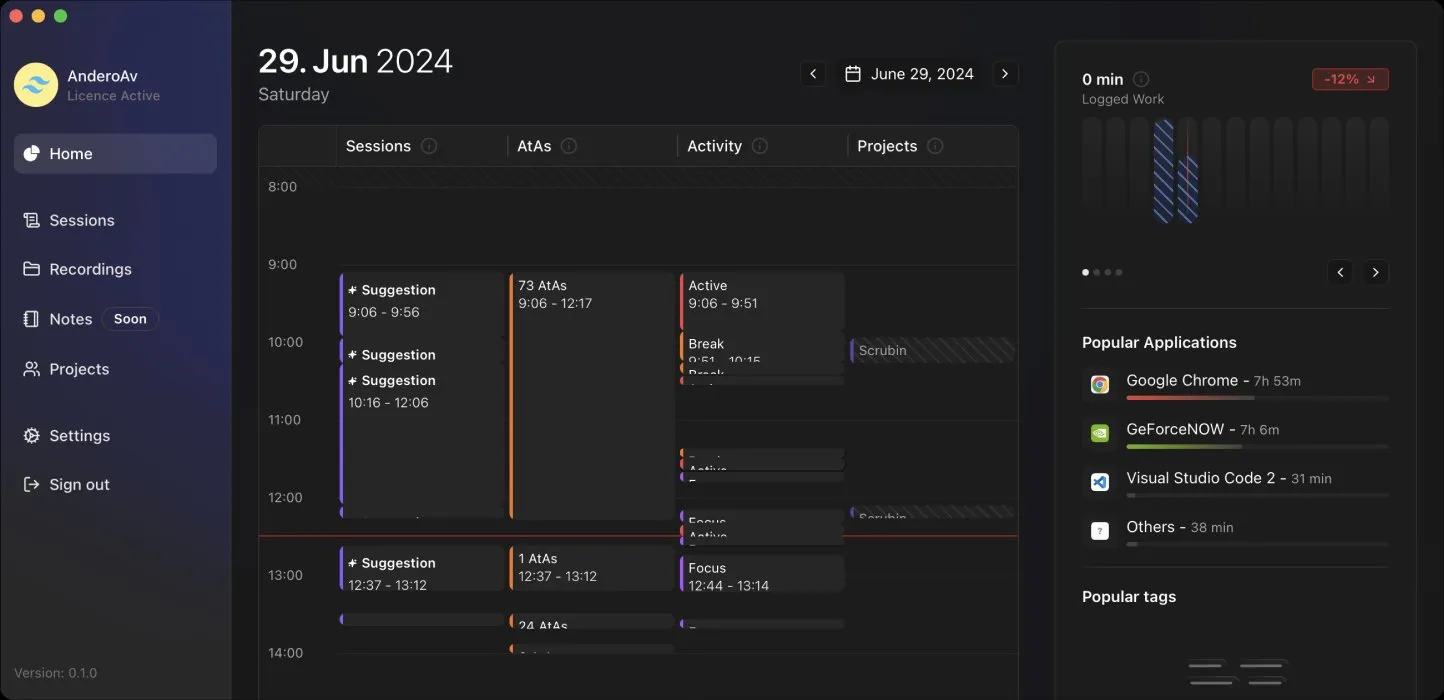
Yes. Taim records which apps and windows you use, splits the day into focus and break periods, and suggests the project for each stretch. You confirm sessions, mark them billable and export to XLS, CSV or PDF. It costs $39 once for one Mac.
On this page
Is there a Mac app that tracks my work hours without me starting a timer?
In short
Yes. Taim runs in the background and logs the time you actually spend in each app and window, not just how long it was open. It sorts the day into Active, Focus, Break and Interrupted periods, pauses for idle time and sleep, and suggests which project each stretch belongs to. You review and confirm instead of running a stopwatch.
How the timeline and project suggestions work
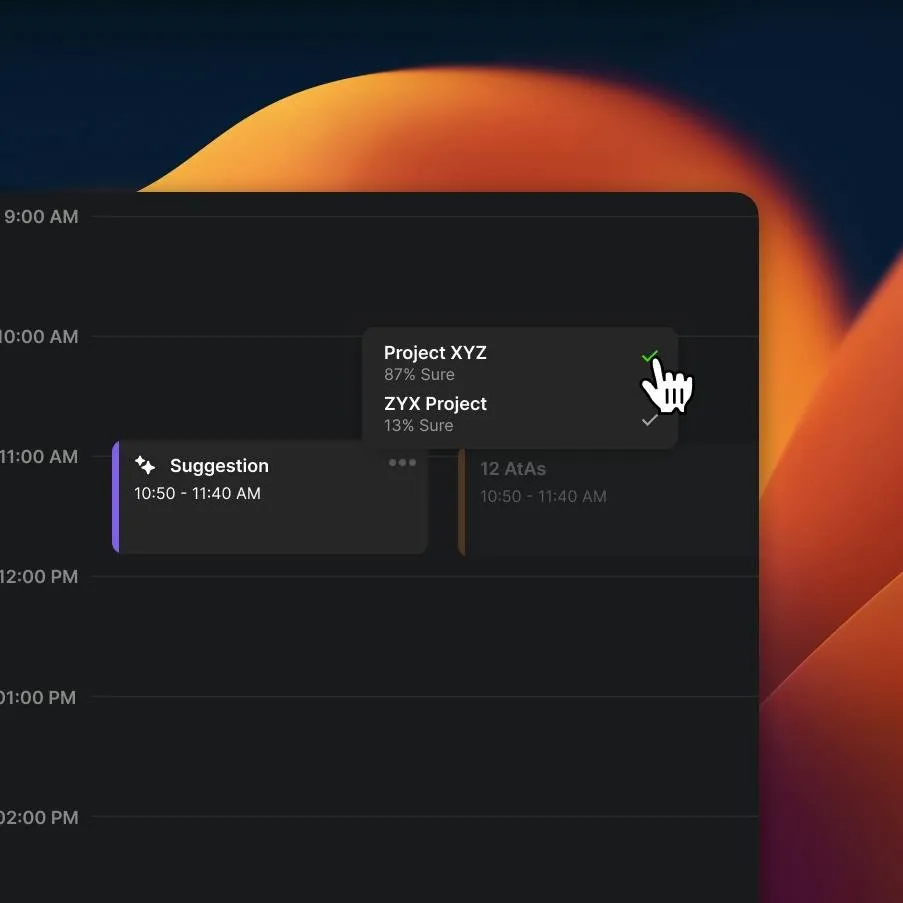
The home screen lays the day out in columns: your sessions, the raw activity, and your projects. Taim groups related windows together and proposes an unsaved session, with a guess at the project based on the app, the window title and your past sessions. The developer's example shows two candidates with a confidence score, 87% and 13%; one click accepts the right one.
Track time without a timer, or with one
Automatic: turn on Autorecord and Taim logs the day on its own. Ignore rules keep chosen apps or websites out of the record.
Manual: drag across the timeline to create a session, then set its title, project, tags, description and hourly rate.
Corrections: change the start, end or date of any session, and Taim flags overlapping sessions and gaps.
Focus help: a built-in Pomodoro timer with preset session and break lengths, plus distraction lists for apps and sites you want to avoid during work.
From tracked time to billable hours
In short
Each project takes an hourly rate, a monthly budget and a billable switch. Sessions can be marked billable and paid, tagged, filtered by date, status, project or tag, and edited in bulk. The export goes out as XLS, CSV or PDF, so you can send exactly the billable hours for one client and one month.
Taim keeps client details and notes alongside the projects, and a desktop widget starts sessions and shows the day's totals without opening the main window. What it does not do yet is push time to other tools: the home page advertises webhooks and Asana and Jira sync, but Taim's own docs mark webhooks as coming soon and the roadmap lists the Asana integration as upcoming. For now, invoicing means exporting a file.
What the $39 licence covers
In short
The Individual licence is $39 once, shown down from $79. It covers one Mac, every feature, local storage and 12 months of updates. When the update period ends the app keeps working; newer versions are sold separately. The Teams plan, with cloud sync across devices, is a per-seat subscription sold by email.
You need an account, created on Taim's website, to activate the licence in the app. Tracked activity stays on your Mac on the Individual plan. Notes you share are stored in the cloud, and the AI features run on OpenAI, using credits included with the licence or your own API key once those run out. Taim claims it uses 0.2 to 1% of the CPU while tracking; that figure is the developer's, not ours.
Price
$39 once
Devices
1 Mac
Updates
12 months
Export
XLS, CSV, PDF
Requires
macOS 13.1+
Refund
No questions asked
Taim vs Timemator, Timing and ActivityWatch
In short
Taim is not the cheapest way to track time automatically. Timemator also costs $39 once, activates on two Macs and has a 30-day free trial. Timing is the most polished name in the category but is sold only as a subscription. ActivityWatch is free and open source, with no billing tools.
| App | Price | Buy once? | Devices | Billing tools | Free trial |
|---|---|---|---|---|---|
Taim this one this article | $39 | Yes, 12 months of updates | 1 Mac | Rates, budgets, billable and paid flags, XLS/CSV/PDF | No; refund policy instead |
Timemator one-time licence | $39 (iOS app $7.99) | Yes | 2 Macs | Hourly rates and revenue reports | 30 days |
Timing subscription | From $10/month | No | 1 Mac on Professional | Reports for clients | 30 days |
ActivityWatch open source | Free | Nothing to buy | Windows, macOS, Linux, Android | None | n/a |
A Timing app alternative you buy once
If you want a long track record, a free trial or a licence for two Macs, Timemator is the safer $39. If you only want to see where your hours go and never invoice, ActivityWatch costs nothing. Taim makes sense if you like its focus and break detection, the Pomodoro timer and the project suggestions, and the refund policy lets you try it without risk.
Who Taim suits, and who should skip it
In short
It suits Mac freelancers and consultants who bill by the hour and keep losing time to forgotten timers. Skip it if you need Windows, which is still listed as coming soon, if you need time pushed into Asana or Jira today, or if you want an app with a long public release history.
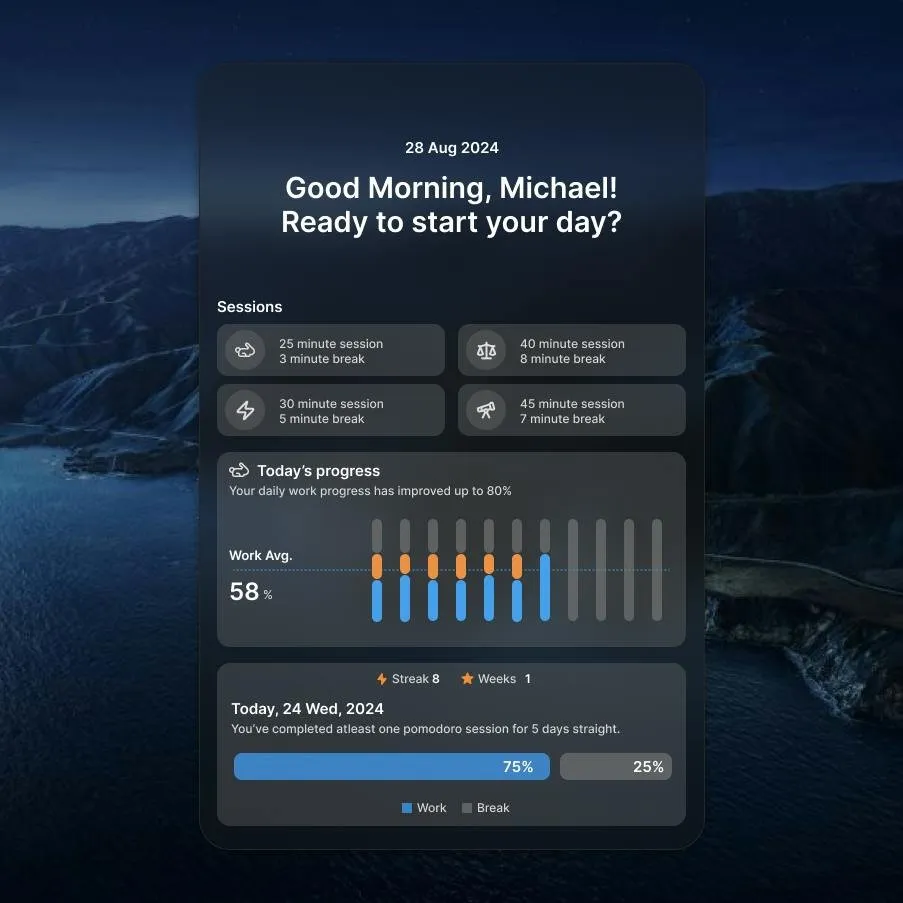
Taim is a young product. The developer's own screenshots show version 0.1.0 with dates from 2024, the site has no public changelog, and the docs page still says it is under construction. None of that stops it tracking your hours, but it is worth knowing before you rely on it for invoices.
Before you buy
There is no trial, so lean on the refund policy: track one real billable week, export it, and compare the total with what you would have invoiced. Prices were verified on 30 October 2026.
Frequently asked questions
Does Taim need a subscription?
Not for one person. The Individual licence is a one-time $39 for one Mac with every feature and 12 months of updates. When the update period ends the app keeps working; newer versions are sold separately. Only the Teams plan, which adds cloud sync and is sold per seat by email, is a subscription.
Is Taim worth $39 when ActivityWatch is free?
Only if you bill your time. ActivityWatch is free, open source and also tracks apps and windows automatically, but it stops at reports. Taim adds what billing needs: project suggestions, hourly rates, monthly budgets, billable and paid flags, and XLS, CSV or PDF export. If you only want to see where your day went, ActivityWatch is enough.
Does Taim send my activity to the cloud?
Not on the Individual licence: Taim says tracked activity is stored on your Mac. Three things do go online: the account you sign in with, notes you choose to share, and AI features, which run on OpenAI with credits included in the licence or your own API key.
Does Taim work with Asana or Jira?
Not yet. The home page mentions webhooks and Asana and Jira sync, but Taim’s own docs list webhooks as coming soon and its roadmap marks the Asana integration as upcoming. Plan on exporting CSV or XLS for now.
Can I get a refund if Taim does not suit me?
Yes, under the current policy. Taim’s FAQ and terms describe a no-questions-asked refund, with a note that the policy may change. There is no free trial on the site, so the refund is the way to test it.
Is Taim the cheapest automatic time tracker you can buy once?
No. Timemator is also $39 once, activates on two Macs instead of one and offers a 30-day free trial. ActivityWatch is free. Taim’s case is its focus and break detection, Pomodoro timer and project suggestions built around billing.
Sources
- 1
Individual licence $39 one-time (shown down from $79), 1 macOS device, free updates for 12 months, local storage; Teams per seat; macOS Ventura 13.1+; no-questions-asked refund; vendor CPU figures.
- 2
Active, Focus, Break and Interrupted states; idle and sleep detection; drag to create sessions; window grouping and project suggestions.
- 3
Taim docs: Budgeting and billable projects
Monthly budget, hourly rate and billable toggle per project.
- 4
Taim docs: Integrations settings
AI features run on OpenAI with included credits or your own key; webhooks marked "Soon".
- 5
Webhooks and Asana integrations, Teams support and Taim for Windows listed as upcoming; ignore rules, idle detection, Pomodoro, budgeting and client management listed as implemented.
- 6
Mac licence $39 one-time, activates on 2 devices; 30-day free trial; auto-tracking rules and activity timeline; requires macOS 10.15; version 3.3.2.
- 7
Subscription plans only; Professional from $10 a month; 30-day free trial.
- 8
Free and open source (MPL-2.0); tracks apps and websites automatically; data stored locally; Windows, macOS, Linux and Android.

Taim
Automated time tracking for accurate billing
once
macOS
More apps worth a look: browse the desktop